

CCNnews
Latest Updates on IT, Cloud & Business SolutionsCyber Security News – September 2018
Monday, 24 September 2018
Welcome to our first Monthly Blog Post where we will be discussing recent Cyber Attacks, Cyber Security and Recent Security Updates for commonly used programs.
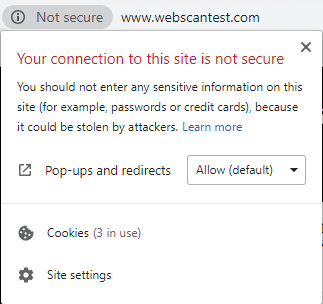 Unsecure Websites are insecure for various reasons such as:
Google Chrome HTTPS Update
Google Chrome have recently rolled out an update across all there browsers & apps that will label any site without a valid SSL Certificate as ‘Unsecure’. The warning will apply to all internet facing websites as well as all private intranet websites.
Unsecure Websites are insecure for various reasons such as:
- Customer information, like credit card numbers is NOT encrypted and can be intercepted.
- Visitors can not verify the identity of the website
Ransomware Attack Hits Bristol Airport
On September 19th, Bristol Airport suffered a ransomware attack that led to all displays displaying as Out of Service. This was the result of poor Cyber Security by Bristol Airport that allowed malicious attacks to encrypt all there back-end systems. While this breach did not directly impact anyone’s confidential data it still had a detrimental effect on the operations of Bristol Airport, it also further displayed that Cyber Attacks are REAL and will pose a threat to organisations moving forward.British Airways Data Breach
On September 6th, British Airways announced that the personal and payment details such as names, email addresses and credit card information was compromised and stolen in a data breach. British Airways said the hack compromised 382000 transactions that were carried out between the 21st August & 5th September. The breach has now been resolved but British Airways advises that anyone who processed a transaction during this time frame to change their passwords across all services.How to Protect Yourself from Cyber Attacks
Following the above mentioned Cyber Attacks it is important that end-users take the necessary steps to protect themselves if they are involved in a Cyber Attack/Data Breach on a company. There are various steps you can take to protect yourself;2FA (2 Factor Authentication)
2 Factor Authentication is a security method that involves a end-user requiring numerous methods of authentication to log into a service, for example;- A User Enters their Password followed by a SMS Message Code
- A User logs into a company’s Intranet with their password followed by scanning a smart card.
Password Strength and Reuse
As well 2FA it is also highly important that end-users do NOT reuse platforms across platforms, it is also highly recommended that all passwords should be between 16-24 characters combined with password being constructed of random characters & symbols.- It is advised that end-users now utilize the use of password managers such as
- 1Password
- LastPass
- Password Managers are secure vaults protected by 2-4 layers of authentication that can store your passwords and sensitive passwords & pins etc.










 Website by